Why Your Finance Team May Still Be Using Too Many Spreadsheets With Sage Intacct
A Finance team can implement a modern ERP system and still spend half its month-end closing files in Excel. That’s not a contradiction. It’s one of the most common patterns Finance Managers run into after a Sage Intacct implementation settles down.
Some organisations moving onto Sage Intacct have reported having more than 40% of their reports built in Excel before the switch, with that figure dropping to close to zero once reporting was rebuilt natively in the system. The gap between those two numbers is the real story here. It shows that spreadsheet dependency isn’t really about the software you’ve bought. It’s about which processes were actually redesigned around that software, and which ones simply moved across unchanged.
This article looks at why your Finance team may still be using too many spreadsheets with Sage Intacct, even though the system has the tools to reduce that reliance, and what to review before you decide where to make changes.
Key Takeaways
- Spreadsheet dependency usually comes from unreviewed habits and legacy processes, not a lack of functionality in Sage Intacct.
- Reporting, budgeting, multi-entity consolidation and project-level planning are the areas where spreadsheets most commonly creep back in.
- Exporting data from Sage Intacct “just to double-check it” is often a sign that reporting or dashboard configuration hasn’t been reviewed since go-live.
- Multi-entity and not-for-profit organisations face particular pressure to use spreadsheets for flexibility that Sage Intacct’s structured reporting may already support.
- A practical review of one process at a time is more effective than trying to remove every spreadsheet at once.
Why Your Finance Team May Still Be Using Too Many Spreadsheets With Sage Intacct Despite Having the System
Sage has described the situation many Finance teams find themselves in as a systems problem rather than a software problem. Too many spreadsheets. Too many manual processes. Not enough real-time visibility. The unsettling part is that this description often applies even to organisations that already run a capable Finance platform.
Sage Intacct gives you real-time reports, dashboards and multi-entity consolidation tools designed to replace a lot of spreadsheet work. But functionality sitting unused in the system doesn’t reduce manual work. Only a reviewed, redesigned process does that.
Here’s the pattern that shows up again and again:
- The implementation focused on getting transactions into the system correctly.
- Reporting was rebuilt to roughly match what existed before, in spreadsheet form.
- Nobody circled back later to ask whether the reporting could be done differently now that the data lived in Sage Intacct.
The result is a Finance team that has the system, but is still working around it rather than through it.
Why This Spreadsheet Habit Matters for Your Month-End and Reporting
Spreadsheet-heavy processes aren’t automatically wrong. A quick working file for a one-off analysis is fine. The problem is when spreadsheets become the permanent home for recurring Finance work that the system could handle on its own.
The cost shows up in a few predictable places:
- Time. Rebuilding the same report logic every period, exporting data, reformatting it and checking the formulas still work.
- Accuracy risk. Manual inputs, broken links and version control issues are well-known weaknesses of spreadsheet-based reporting, especially once a file has been copied and edited by more than one person.
- Visibility. When numbers live in separate files on separate laptops, your leadership team doesn’t get timely insight. They get whatever was last exported.
- Audit trail. Sage Intacct keeps a structured, traceable record of transactions and changes. A spreadsheet generally doesn’t, unless someone is disciplined about version history.
Sage’s own reporting materials make a direct connection here: when financial information is scattered across disconnected spreadsheets and manual processes, it becomes harder to get timely insight to the people making decisions. That’s the practical reason this matters, beyond simply wanting a tidier process.
Common Reasons Finance Teams Still Rely on Spreadsheets With Sage Intacct
It helps to be specific about why the habit persists, rather than treating it as a vague efficiency problem.
1. The process was never redesigned after go-live
Many implementations focus on getting the core system live by a deadline. Reporting is often rebuilt to replicate what existed before, in spreadsheet form, rather than redesigned around what Sage Intacct can now do natively.
2. Knowledge of newer functionality hasn’t reached the team
Sage Intacct has introduced reporting, dashboard and automation functionality over time. If your team learned the system a few releases ago and hasn’t had refresher training, they may not know what’s changed.
3. Spreadsheets feel faster in the moment
If a user already knows Excel well and finds the native reporting tools unfamiliar, they will default to exporting data and working in the tool they trust. This is a training and confidence issue more than a system limitation.
4. Planning and budgeting flexibility
Some organisations run project-level budgets in Excel or Smartsheet while corporate budgets stay in Sage Intacct, because their planning process needs more flexibility than they’ve configured in the system. This keeps spreadsheets inside the budgeting cycle even after the rest of Finance has moved on.
5. Multi-entity complexity
As organisations add entities, funds, programs or complex ownership structures, reporting and consolidation become harder to manage. Without deliberate configuration, spreadsheets fill the gap.
Where Spreadsheets Often Creep Back Into Sage Intacct Processes
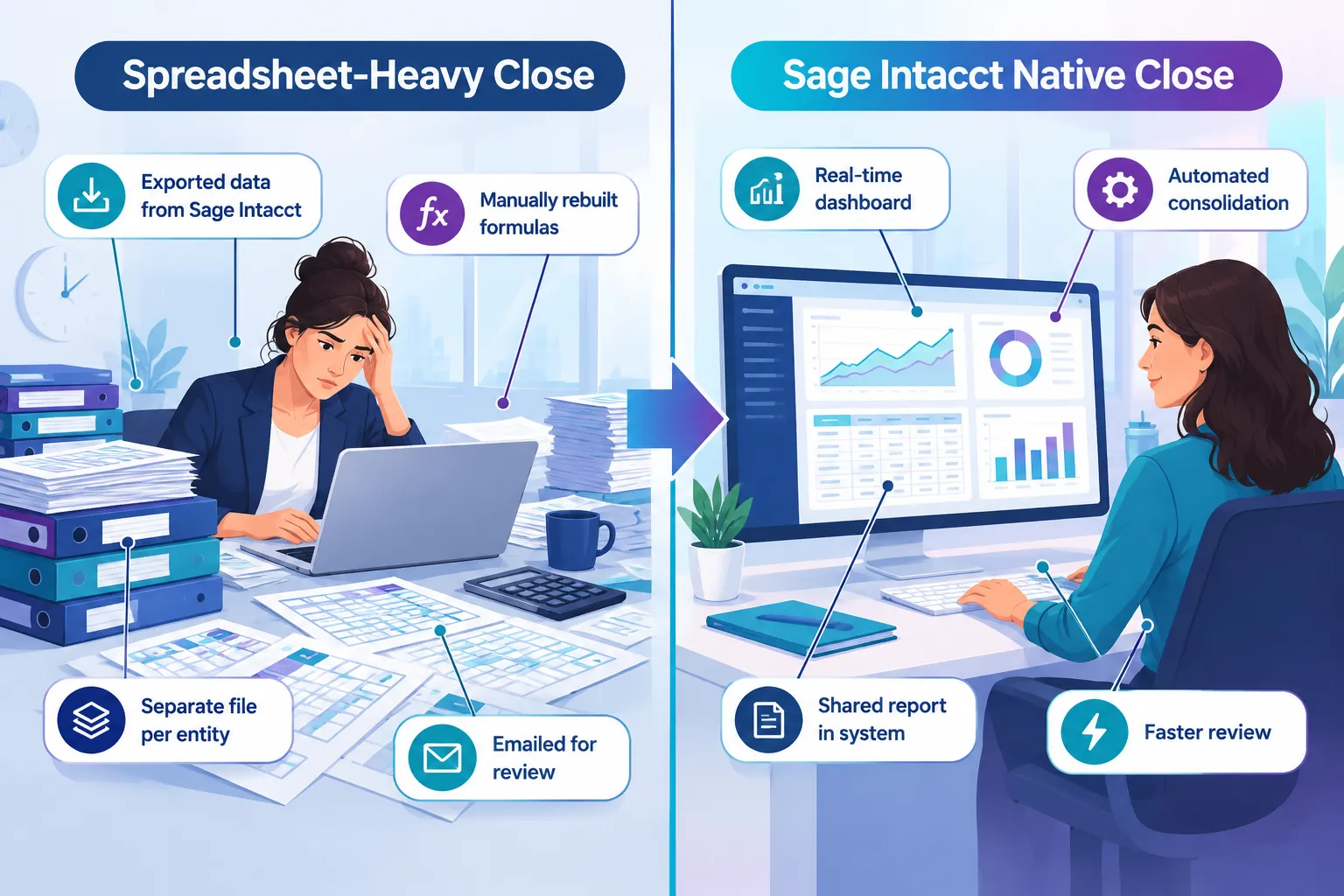
Spreadsheet dependency rarely shows up evenly. It tends to concentrate in a handful of recurring Finance activities.
Management reporting
A common habit is exporting trial balance or GL data from Sage Intacct, then rebuilding the management report layout in Excel every month. If your reports were designed during implementation and haven’t been revisited, this is worth a second look. Sage Intacct’s standard reports, dashboards and interactive custom report writer are built to centralise exactly this kind of reporting.
Budgeting and forecasting
If your budgeting cycle involves emailing spreadsheet templates to budget holders, consolidating their responses manually, then re-entering final figures into Sage Intacct, you are running a parallel system alongside your ERP. Sage’s financial planning and budgeting tools are positioned directly at this workflow, aimed at organisations whose planning work is “spread across multiple spreadsheets.”
Multi-entity consolidation
Manually reconciling intercompany transactions, chasing figures from different entities and fixing broken formulas before you can see accurate consolidated numbers is a classic month-end bottleneck. Sage Intacct’s multi-entity consolidation functionality is designed to consolidate entities without that manual rebuild each period.
Project or program-level budgets
Not-for-profit and project-based organisations often keep granular, flexible project budgets outside Sage Intacct because the standard configuration doesn’t match how program managers want to plan. This is a configuration and process question worth reviewing rather than accepting as permanent.
AP and data entry workflows
Manually re-keying invoice data, or reconciling bank transactions in a spreadsheet before posting, duplicates work that Sage Intacct’s AP automation and bank feed functionality is designed to reduce. Availability of specific automation features should always be checked against current Australian documentation, since functionality rollout can differ by region.
How to Review Whether a Spreadsheet Process Could Move Into Sage Intacct
Before deciding to change anything, it helps to understand why a particular spreadsheet exists. Not every spreadsheet is a problem. Some are genuinely the right tool for a one-off or highly variable task.
A practical review looks like this:
- List the recurring spreadsheets your team relies on each month. Focus on anything repeated every period, not one-off analysis.
- For each one, ask what it’s actually doing. Is it pulling data out of Sage Intacct? Reformatting a report? Running a calculation the system could do?
- Check whether the underlying Sage Intacct functionality already exists. Dimensions, reporting, dashboards and consolidation tools may already support the outcome you’re achieving manually.
- Identify what’s stopping you from using it today. Is it a configuration gap, a training gap, or a genuine functionality limitation?
- Confirm Australian availability for anything newer. Features released for other regions, or still in Early Adopter status, may not be generally available in Australia yet.
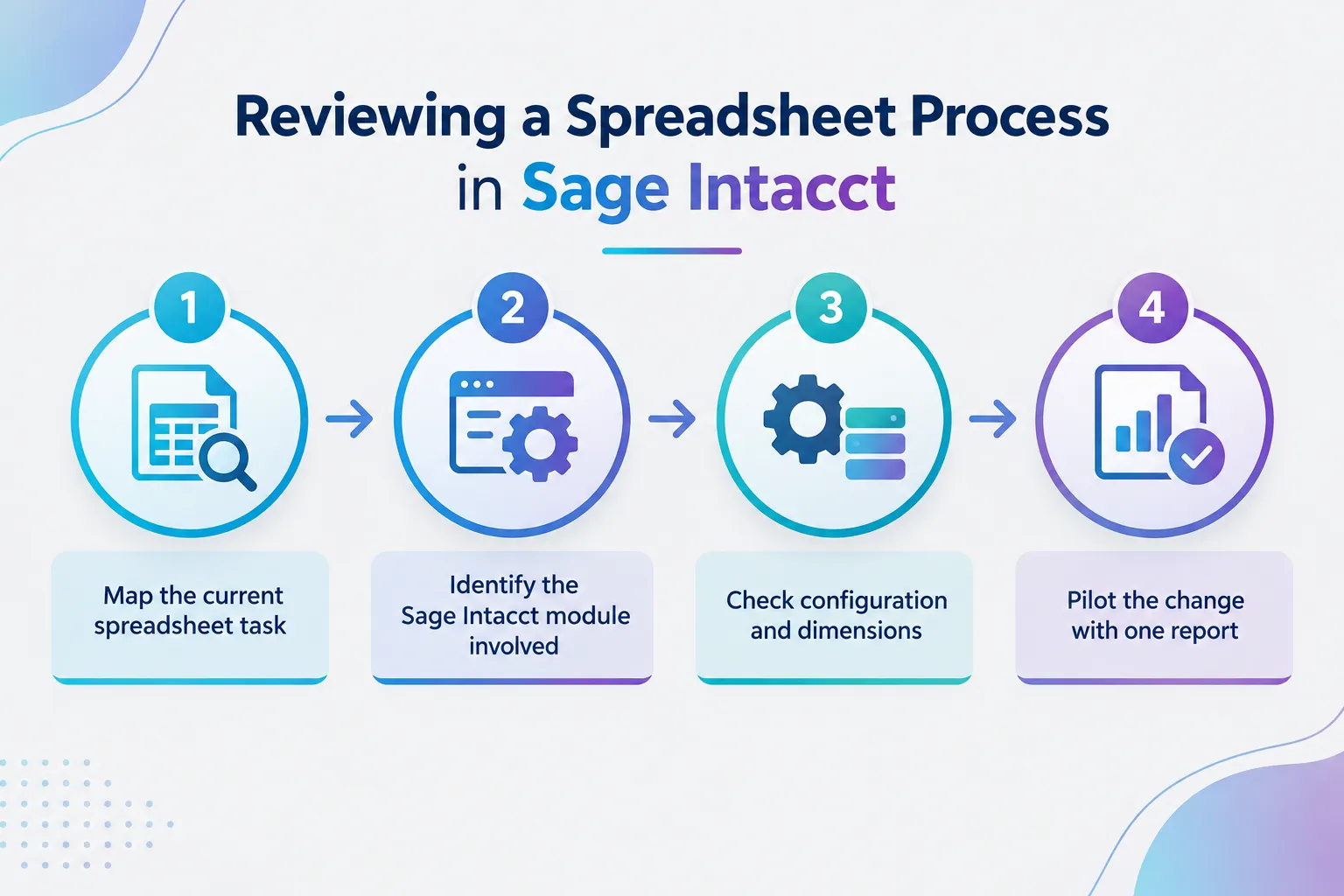
This review is really about separating “we’ve always done it this way” from “this is genuinely the best way to do it.”
Questions to Ask Before Removing a Spreadsheet From Your Process
It’s worth pausing on a few questions with your team before making changes:
- Who built this spreadsheet originally, and do they still work here?
- What would happen if that person was unavailable during month-end?
- Does the spreadsheet contain logic or assumptions that exist nowhere else in writing?
- Is this spreadsheet solving a genuine configuration gap, or a comfort habit?
- Would additional Sage Intacct training close the gap, rather than more manual workarounds?
- Has anyone checked whether a recent Sage Intacct release added functionality relevant to this task?
Finance Managers often find that knowledge about a particular spreadsheet process sits with one or two people. That’s a risk in itself, separate from the spreadsheet question. If the logic only exists in someone’s head and a file, moving it into Sage Intacct also means documenting it properly for the first time.
Practical Next Steps to Reduce Spreadsheet Dependency With Sage Intacct
You don’t need to tackle every spreadsheet at once. A staged approach tends to work better and causes less disruption to a working month-end close.
A reasonable sequence looks like this:
- Start with your most time-consuming recurring report. Rebuild it as a native Sage Intacct report or dashboard and run both versions side by side for one cycle.
- Review your dimension structure. Many spreadsheet workarounds exist because reporting dimensions weren’t set up to answer the questions being asked today.
- Check what’s changed in recent Sage Intacct releases. Functionality may now exist that wasn’t available, or wasn’t understood, when the spreadsheet habit started.
- Build in refresher training for the team members who rely most heavily on spreadsheet workarounds. This is often a confidence gap, not a willingness gap.
- Document the process once it moves into Sage Intacct, so the knowledge isn’t tied to one person.
An independent Sage Intacct consultant can be useful at this stage, particularly for reviewing configuration, dimension structure and reporting setup against what your organisation actually needs now, rather than what was configured at implementation. This kind of review is also common ground for Sage Intacct support and optimisation work, separate from a new implementation project.
FAQ
Is it realistic to remove spreadsheets from Finance completely? No, and that’s not really the goal. Some analysis work genuinely suits a spreadsheet. The goal is removing spreadsheets from recurring, repeatable processes that Sage Intacct can already handle, so your team spends less time rebuilding the same report every period.
Does moving reporting into Sage Intacct mean losing Excel formatting flexibility? Not necessarily. Many organisations still export a final version to Excel for board packs or presentation formatting. The difference is whether the underlying numbers were built in Sage Intacct first, rather than reconstructed manually from scratch.
How do we know if our dimension setup is holding us back? If your team regularly says “we can’t get that view directly from the system,” that’s usually a sign the dimension structure or report configuration hasn’t kept pace with your reporting needs. It’s worth a dedicated review rather than guessing.
Is this mainly a not-for-profit problem, or does it apply to other organisations too? It applies broadly. Not-for-profit organisations often feel it more because of program, fund and multi-entity reporting needs, but mid-market organisations with multiple entities or complex budgeting face the same pattern.
Should we review this ourselves or bring in outside help? Many Finance teams can do an initial spreadsheet audit internally. Where it gets more complex is translating that into configuration changes, dimension structure or report builds. That’s often where remote Sage Intacct consulting support adds the most value, particularly for organisations without a dedicated Finance systems resource.
Will new Sage AI or automation features remove the need for spreadsheets entirely? Some newer Sage Intacct automation and AI-related functionality is designed to reduce manual reconciliation and data entry work. Availability varies, and not every feature announced for other regions is confirmed as generally available in Australia. Always check current Sage Intacct Australia documentation before assuming a feature is ready to use.
Conclusion
Spreadsheet dependency after a Sage Intacct implementation is common, and it’s rarely a sign that the system was the wrong choice. It’s usually a sign that one or two processes were never redesigned around what the system can actually do.
The practical path forward is a targeted review, not a wholesale rebuild. Pick the recurring report, reconciliation or budget process costing your team the most time each month. Check what Sage Intacct already offers for that specific task, confirm Australian availability for anything newer, and test the change on one cycle before rolling it out further.
If your Finance team wants a second opinion on where spreadsheets could safely move into Sage Intacct, a focused review of your reporting, dimensions and configuration is a practical place to start.
Meta Title: Why Finance Teams Still Use Too Many Spreadsheets With Sage Intacct
Meta Description: Learn why Finance teams still rely on spreadsheets with Sage Intacct and how to review reporting, budgeting and consolidation processes to reduce manual work.
Tags: Sage Intacct, Sage Intacct consulting, Finance automation, spreadsheet dependency, Sage Intacct reporting, Sage Intacct dashboards, month-end close, multi-entity accounting, Sage Intacct not-for-profit, Finance process improvement, Sage Intacct Australia, Finance systems consultant
Contributing writer at Dynamic Zenergy.